
Bosses and tower levels
Use the Palworld map bosses layer for Alpha Pals, sealed realms, towers, and dungeon bosses before you fly across the map. Level labels help you avoid routes that are too early for your current gear.
Interactive map
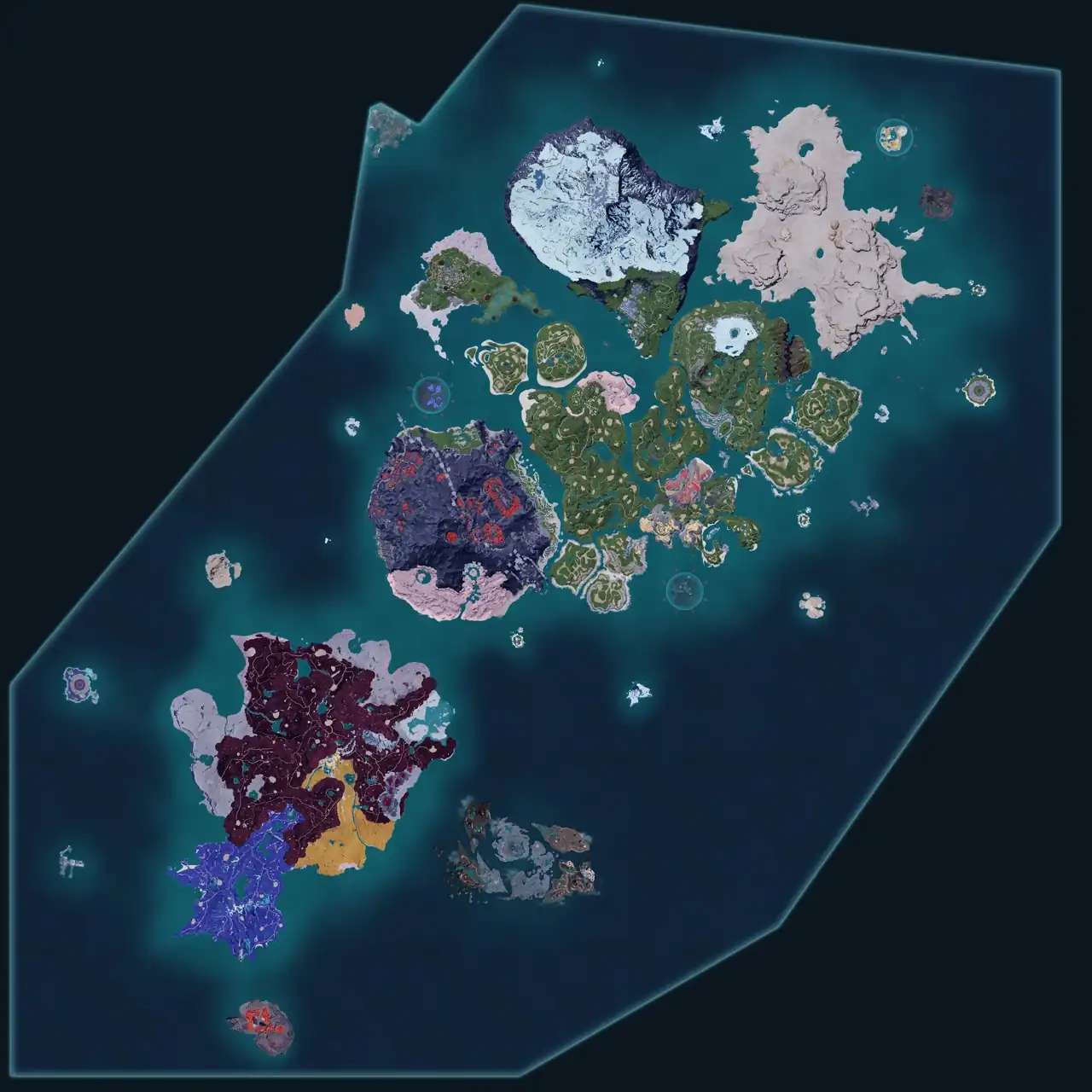
Search this Palworld map for locations, coordinates, bosses, towers, fast travel, dungeons, ore, hardwood, Pal eggs, Skill Fruits, and World Tree markers. Use filters, copy Palworld map coordinates, and mark points as found locally while planning your next route.
Map tool
Data loaded July 16, 2026. Marker progress is saved locally on this device. Use Palworld map search or turn layers on and off for combat, travel, dungeon, egg, tree, and resource runs.
Breeding route
Use the Palworld breeding calculator to check parent pairs, child results, and owned-Pal routes before you cross the map.
Common uses
Start with the route you want to run, then use filters and search to narrow exact Palworld map locations while keeping the map readable.
Use the Palworld map bosses layer for Alpha Pals, sealed realms, towers, and dungeon bosses before you fly across the map. Level labels help you avoid routes that are too early for your current gear.
Turn on Palworld map resources such as ore, coal, sulfur, quartz, Soralite, Paloxite, hardwood trees, eggs, Skill Fruits, and lotus layers when planning a farm or base supply route.
Use Palworld map coordinates from Great Eagle Statues and watchtowers as anchors, then compare marker positions with your in-game route or notes.
Switch this Palworld map to the World Tree view when you need those markers without mixing them into Palpagos routes.
Popular searches
These groups match the long-tail searches players use when they are already in a session and need an answer quickly.
Use Palworld map fast travel and watchtower points as route anchors for bosses, dungeons, and resource loops.
Bosses and Alpha PalsOpen Palworld map bosses and Alpha Pal markers when searching for boss locations, map levels, or tower routes.
Dungeons and CavesFilter Palworld map dungeons and sealed realms when you want a cleaner route for combat checks.
ResourcesOpen Palworld map resources for ore, coal, sulfur, quartz, Soralite, Paloxite, eggs, Skill Fruits, lotus, hardwood, and tree layers.
Eggs and Skill FruitsFind Palworld map egg and Skill Fruit markers without mixing them into boss or dungeon routes.
World TreeUse the Palworld map World Tree view for markers that should not be mixed into the main Palpagos route.
Workflow
Coverage
The current Palworld map build is focused on route planning: fast travel, watchtowers, towers, bosses, dungeons, sealed realms, resource nodes, Pal eggs, Skill Fruits, lotus, ore, coal, sulfur, quartz, Soralite, Paloxite, hardwood, and World Tree markers.
Effigy locations, chests, NPCs, merchants, crude oil, and every wild Pal spawn are not claimed as covered unless those layers are added to the visible filter data.
FAQ
The best map is the one that answers your current route question quickly. This Palworld map focuses on location lookup with filters, coordinates, local found tracking, Palpagos, and World Tree markers.
Yes. This Palworld map shows coordinates in the selected marker panel and cursor readout so you can compare locations with in-game notes or other guides.
Boss and sealed-realm markers show level information when the current data includes it. Use those labels as route-planning help, then verify in game before spending resources.
Yes. Use the Palworld map resources filters for ore plus coal, sulfur, quartz, Soralite, Paloxite, eggs, Skill Fruits, lotus, and tree resources such as hardwood.
Use the tree resource filters to show hardwood tree markers. The map separates hardwood from regular wood and mythical wood where those categories are available.
Yes. The map includes a World Tree region switcher with its own markers, so World Tree routes can be checked separately from Palpagos.
Yes. Start with a goal, such as finding a boss, checking a dungeon route, or farming a resource, then use the Palworld map filters and search box to narrow the route.
Yes. The found state is saved in your browser only, so it is useful for personal route tracking without requiring an account.
Yes. On smaller screens the filters open as an overlay, the map remains touch-draggable, and the selected marker details stay close to the bottom of the tool.
Different maps group, verify, and hide locations in different ways. This map should only be read against the layers visible in its own data version.
No. Palworld Breeding is an unofficial fan-made tool and is not affiliated with, endorsed by, sponsored by, or approved by Pocketpair.
Bugs, ideas, data fixes, or quick notes. Every message gets read.