
Owned-Pals route guide
Palworld Breeding Route From Owned Pals
Use this Palworld breeding route from owned Pals guide when the question is not "what can breed this Pal?" but "can my current Palbox get me there?" Add the species you own, choose one target, and the calculator checks direct parent pairs before building a short route through intermediate children.
Quick answer
For a Palworld breeding route from owned Pals, choose Owned Pals mode, add the Pal species you already have, then choose the target Pal. Read the target block at the top of the result: it tells you whether the target is already owned, whether two owned species can breed it directly, or whether the shortest current route needs intermediate children.
- Use the direct pair if it appears; it is the least confusing route to verify in game.
- Follow multi-step routes in order because later steps depend on children from earlier steps.
- If no route appears, add more owned species or open Target to Parents to see what you are missing.
Pick the right calculator mode
A Palworld breeding route from owned Pals starts with your Palbox
Owned Pals -> Target
Use this when your real Palbox matters. Shows direct owned pairs first, then a short route that reuses newly bred children.
Target -> Parents
Use this when you only care about one Pal. Lists every current parent pair for the target, including pairs you may not own yet.
Parents -> Child
Use this when an old guide gives you two parents. Checks what those two parents produce in the current dataset before you spend Cake.
One Parent -> Offspring
Use this when you have one strong Pal to build around. Shows possible children that can use that species as either parent.
How to use owned route mode
Build a Palworld breeding route from owned Pals in four checks
- Add the species you can actually use. Select every Pal species in your Palbox that you are willing to put into the route. The tool treats each selected species as available for future steps.
- Choose one target. Pick the child species you want, such as Anubis, Eidrolon, Aegidron, or Renjishi. A target keeps the result focused on one route instead of every possible child.
- Read the target result first. Check whether the target is already owned, whether a direct owned pair exists, or whether the route needs intermediate children.
- Use each new child as the next parent. For multi-step routes, breed the listed steps in order. The current route search stops at 6 breeding steps.
Worked example: Anubis and Necromus to Renjishi
A current multi-step route from selected owned species
In this example the owned list has Anubis and Necromus, and the target is Renjishi. There is no direct owned pair for Renjishi from those two starting species, so the planner uses newly bred children as future parents.
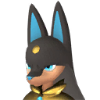 AnubisOwned
 NecromusOwned
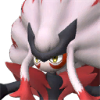 RenjishiTarget
- Step 1Anubis#139+Necromus#199=
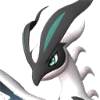 Eidrolon#171
 - Step 2Anubis#139+Eidrolon#171=
 Flaracle#174
 - Step 3Necromus#199+Flaracle#174=Renjishi#183
The important part is the dependency order: breed Eidrolonfirst, then use it to make Flaracle, then finish the route into Renjishi. Open the live example if you want to compare the page against the calculator output.
How to read the route result
Direct pair, multi-step path, or already owned
Direct match
Two selected owned species can already produce the target. Start there, then handle gender, Cake, passives, and incubation in game.
Multi-step route
No direct owned pair was found, but the planner found intermediate children that can become parents for later steps.
Already owned
If the target species is in your owned list, the route is complete. Use the target page only if you want extra copies or better traits.
No route found
Your selected species do not connect to the target within the step cap. Add more owned species or inspect all target parents.
Popular owned route targets
Start with a target, then add what you own
Anubis#139231 parent optionsSet Anubis as the goal and choose usable Palbox species.
Eidrolon#171254 parent optionsSet Eidrolon as the goal and choose usable Palbox species.
 Aegidron#184
101 parent optionsSet Aegidron as the goal and choose usable Palbox species.
Renjishi#18343 parent optionsSet Renjishi as the goal and choose usable Palbox species.
What owned mode does and does not count
Use it for species planning, then verify the in-game details
It counts selected species
Choosing Anubis means the route can use an Anubis as a parent. It does not choose which individual Anubis from your Palbox should enter the farm.
It does not read your save
You add species manually. The selected species and target can live in the URL, but no save file is imported or uploaded.
It ignores trait goals
Passive skills, IVs, active-skill inheritance, Mutation rolls, and work suitability outcomes still need in-game planning after the species route is chosen.
It has a route cap
The current shortest-path search stops at 6 breeding steps, so a missing route can mean "not found inside this cap" rather than "mathematically impossible."
When no route appears
Add coverage, then inspect the target
- Add more common early or mid-game species you actually own.
- Open Target to Parents to see every current parent pair for the target Pal.
- Check the breeding combinations list for practical target examples.
- Read the 1.0 breeding changes guide if an old route does not match.
Data version
The route planner uses the calculator dataset
This Palworld breeding route from owned Pals page uses the current calculator dataset:2026-07-15.palcalc-v26.b822c7f. Game version: Palworld 1.0. Generated: Jul 15, 2026. Source hash:4e67df4d0da0....
See data sources and the changelog before comparing a route against old spreadsheets or pre-1.0 guide pages.
Owned route FAQ
Shortest paths, URL sharing, and limits
What is an owned-Pals breeding route?
It is a species-level route from Pals you manually selected as owned toward one target Pal. The calculator checks direct owned pairs first, then short multi-step paths.
Does owned mode import my Palbox or save file?
No. You choose species manually in the browser. The selection can be represented in the page URL for sharing or returning to a route, but this version does not import save files.
Why does the page say species route instead of exact Pal route?
Because one selected species can stand for any individual Pal of that species. The planner does not know gender, passives, IVs, active skills, Mutation rolls, or which copy is currently assigned in your base.
Why does no route appear for my target?
The selected species may not connect to that target within 6 breeding steps. Add more owned species, or switch to target mode to inspect every current parent pair.
Can I share an owned-Pals route?
Yes. Owned mode writes selected owned species and the target into the URL query, so you can keep or share a route setup without an account.
Should I follow a route if an old combo guide says something different?
Check the current calculator result first. Palworld 1.0 changed many breeding outcomes, so an older route can still hatch an egg while producing a different species.